
 Home Page - qModel Open-Source Edition
🌟 Home Page: A Centralized Overview of Core System Data
Home Page Overview
After logging into the qModel algorithm model platform, you will be directed to a clean, efficient, and information-rich home interface. As the entry point to the system, the homepage consolidates key performance indicators and high-frequency functional shortcuts, enabling users to quickly grasp the platform's operational status and perform tasks efficiently.
Page Content Overview
The homepage features a clear layout, organizing core information into distinct sections for instant visibility:
- Core Data Statistics: Displays key metrics such as total models, total services, and number of computation tasks;
- Visual Charts: Presents a model type distribution chart and a trend graph of computation tasks over the past 7 days, offering an intuitive view of data changes;
- Quick Access Panel: Provides shortcuts to frequently used features such as Model Management, Model Computation, and Model Access;
- News & Announcements: Shows the latest platform updates and notices, ensuring users stay informed about new features and changes.
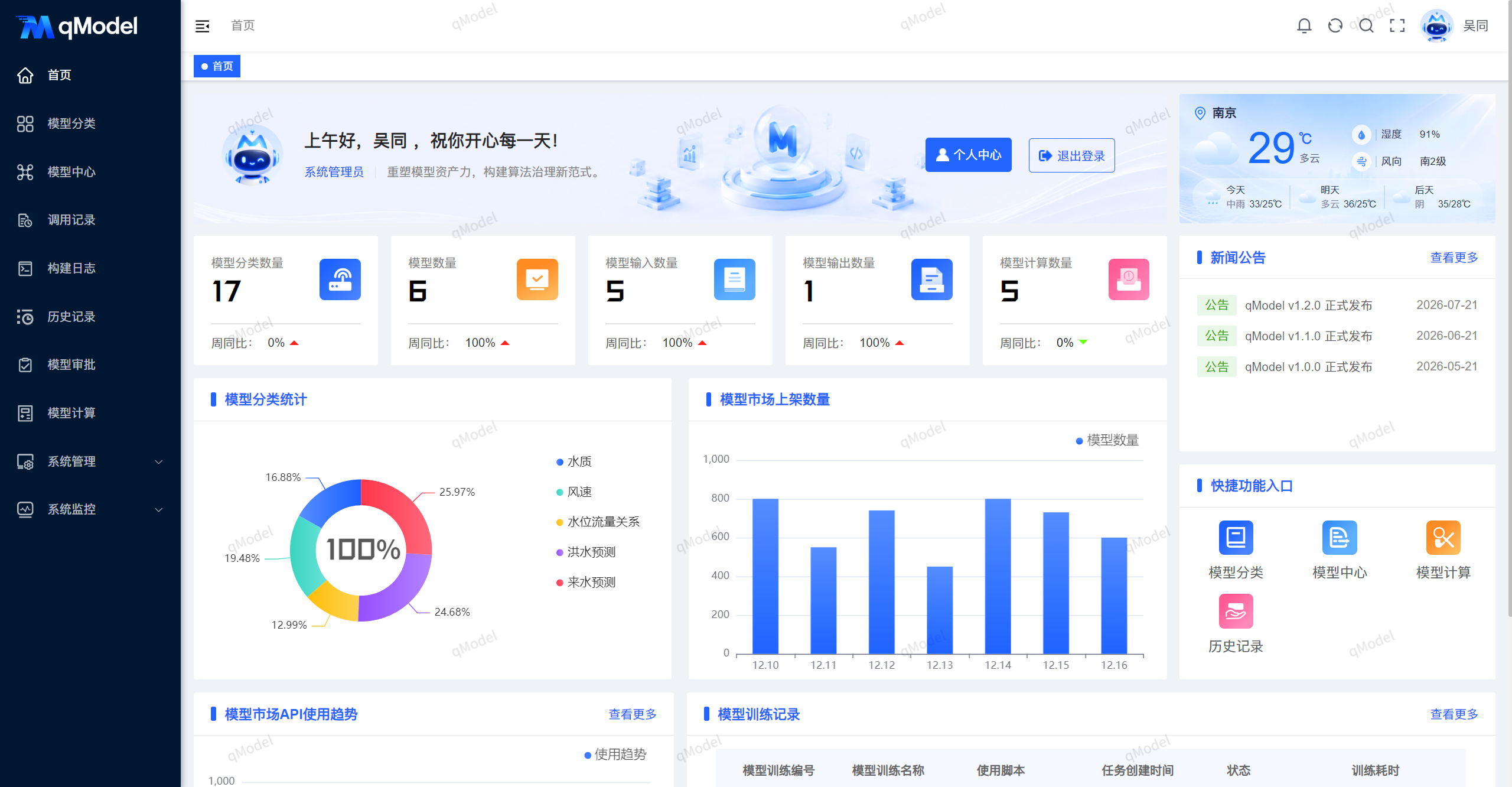
Designed with user experience at its core, the page emphasizes information hierarchy and operational efficiency, enabling users to seamlessly transition from "viewing data" to "taking action" in minimal time.
To learn more about each functional module, please proceed to the next chapter: Model Management.